
Airtel Broadband Beetel Modem Default Password 450tc1
Airtel Broadband Beetel adsl2+router 450tc2 450tc1 450tc3 110bx1 220bx 110tc1 password
Last verified: November 2026.
Beetel Router Login: Quick Answer
- Open http://192.168.1.1, user admin, password password.
- Some Airtel firmware uses admin / admin; also check the label under the modem.
- Forgot it? With the modem on, hold Reset for about 10 seconds, then log in with the defaults.
- A reset removes the Airtel broadband (PPPoE) user ID and password; keep them ready or ask Airtel.
Airtel Beetel Router Username Password
Default User Name : admin
Password : password
Default IP/ URL : 192.168.1.1
If you forget the password, you can factory reset the modem.
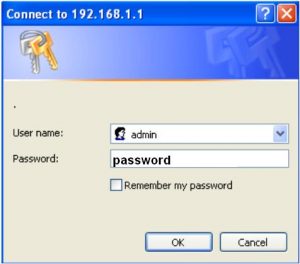
How To change the Beetel Modem Default Password
Log in to your Beetel modem through Browser http://192.168.1.1
Go to Maintenance -> Access control -> password
Select username : admin
Old Password : password
New Password : Provide a New password in New password & confirm password field
Click SaveApply Button

